A great product rarely sells itself on Amazon. The listing sells it the title that gets the click, the bullets that answer the question before it's asked, the description that closes the deal. Writing that listing well takes keyword research, copywriting skill, and a working knowledge of Amazon's formatting rules, and most sellers don't have time to be excellent at all three at once.
That's the gap AI fills. Used well, it turns a rough set of product facts into a structured, keyword-relevant draft in minutes instead of hours. Used badly, it produces generic copy that reads like every other AI-written listing in your category vague benefits, recycled phrasing, and claims nobody bothered to check.
This guide shows you how to write Amazon product listings with AI the way that actually works a repeatable process, a prompt for every step that you can copy and adapt, and the mistakes, tools, and trade-offs worth knowing about before you publish anything AI helped write.
Why Sellers Are Turning to AI for Amazon Listings
Amazon rewards listings that are keyword-relevant, clearly written, and consistent across every field title, bullets, description, and backend search terms all need to work together instead of repeating each other. Doing that by hand across dozens or hundreds of SKUs is slow. AI speeds up the mechanical part structuring specs into benefit-led copy, generating multiple options to test, translating a listing for another marketplace so you can spend your time on the part AI can't do: knowing your product, your customer, and what makes this listing different from the ten competing ones on the same search page.
How to Write Amazon Product Listings With AI: A 7-Step Process
Follow these seven steps in order. Each one includes a prompt you can copy, adjust to your product, and run through Amazon's own AI tools or any general AI assistant.
Step 1: Build a product brief before you write a single prompt
AI output is only as good as what you feed it. A one-line description produces a generic, hallucination-prone draft no matter which tool generates it. Before you open any AI tool, write a short brief for the product:
-
Product type, brand, model, and variants (size, color, material)
-
Core specs with real numbers: dimensions, capacity, weight, certifications, warranty
-
The three or four benefits that matter most, ranked by importance
-
Who buys it and why: the use case, the occasion, the problem it solves
-
The objections it needs to overcome: durability, sizing, cleaning, compatibility
-
What's explicitly not included in the box
-
Any claim you're not legally allowed to make
Prompt that works for this step:
"Turn these rough product notes into a structured product brief for an Amazon listing. Organize it under these headings: Product Basics, Key Specs, Top Benefits, Target Customer, Objections to Address, What's Not Included, Compliance Notes. Ask me up to 5 clarifying questions if anything important is missing. Notes: [paste your raw notes here]."
Reuse this brief in every prompt that follows. When the title, bullets, description, and A+ Content all pull from the same source facts, the listing reads as one coherent product story instead of five disconnected sections.
Step 2: Research and map your keywords
AI organizes keywords well, but it can't reliably invent the exact phrases real shoppers type into the Amazon search bar. Pull those from Amazon's autocomplete suggestions, competitor titles and bullets, and the language customers use in reviews and Q&A. Then sort what you find into four groups: primary (the one phrase you most need to rank for), secondary (close modifiers and synonyms), use-case (where or when the product gets used), and outcome (what it does for the buyer).
Prompt that works for this step:
"Here is a list of raw keyword phrases for an Amazon product: [paste list]. Group them into four categories: Primary Keyword, Secondary Keywords, Use-Case Keywords, and Outcome Keywords. Flag any that look redundant or too broad to be useful."
Your primary keyword belongs in the title. Secondary and use-case terms spread naturally across bullets and the Item Highlights field. Everything leftover synonyms, regional spelling variants, phrases too awkward for customer-facing copy goes into backend search terms, where the algorithm reads them and shoppers never see them.
Step 3: Write a title that's clear in two seconds
Amazon has been tightening title requirements for years, and current guidance favors shorter, cleaner titles over the old keyword-stuffed approach leading with brand and product type, then the single strongest differentiator, rather than a string of attributes. Always check your specific category's current title length limit in Seller Central before you finalize anything, since limits vary by category and Amazon updates them periodically.
Prompt that works for this step:
"Write 8 Amazon product titles for this product. Lead with brand and product type, then the single strongest differentiator. No promotional language, no ALL CAPS, no competitor names, no unverified claims, no repeated keywords. Keep each title under [X] characters based on my category's limit. Include the primary keyword exactly once. Product brief: [paste]. Primary keyword: [x]."
Read the winning title out loud. If it takes more than two seconds to understand what the product actually is, cut a word and try again.
Step 4: Use Item Highlights or supplementary attribute fields to your advantage
Many sellers fill out the title and bullets carefully, then leave supplementary fields like Item Highlights blank which means anyone who does fill them in picks up easy, low-competition ground. These fields are searchable and often display prominently on mobile, where most Amazon shopping happens.
Prompt that works for this step:
"Write 3 short highlight lines for this product, each under 125 characters. Cover: the primary material, a recommended use case, and one attribute a shopper would use to compare this product against similar ones. Don't repeat anything already used in the title."
Step 5: Write bullet points that lead with benefits, not specs
The bullet structure that reliably converts is benefit first, feature second, proof or spec third. A bullet that opens with a spec "18/8 stainless steel construction" reads like a datasheet. A bullet that opens with the payoff "Stays cold through a full workday" gives the shopper a reason to keep reading before the spec even lands.
Prompt that works for this step:
"Write 5 Amazon bullet points for this product. Open each bullet with a short benefit phrase, then explain the feature, then include one concrete number or spec if available. Spread these keywords naturally across the bullets without repeating any single phrase twice: [keyword list]. Avoid medical, legal, or unverifiable claims. Product brief: [paste]."
Dedicate one bullet to the single most common objection sizing, cleaning, compatibility and one to exactly what's in the box. Those two bullets prevent more returns than any amount of persuasive language.
Worked example an LED desk lamp with a built-in wireless charging pad:
-
Charge your phone while you work: a 10W wireless charging pad is built into the base, so there's no extra cable cluttering your desk
-
Light that adjusts to your eyes: 5 color temperatures and 10 brightness levels via touch control, from warm reading light to cool daylight for focus work
-
Built to survive a full workday: an aluminum arm with 3 pivot points holds its angle; it powers over USB-C, with the cable included
-
Easy on tired eyes: a flicker-free LED panel rated for 50,000 hours, with no strobing even at low brightness
-
In the box: lamp, USB-C cable, quick-start guide no wall adapter needed if you're plugging into a laptop or an existing USB port
None of these bullets open with a spec. The spec arrives as proof, after the reader already knows why to care.
Step 6: Draft a description that reduces returns, not just fills space
Shoppers who scroll down to the description are usually hunting for reassurance before they commit that matters most for gifts, technical products, and anything above impulse-buy pricing.
Prompt that works for this step:
"Write an Amazon product description in a plain, trustworthy tone, using short paragraphs. Cover: who it's for, the top 3 benefits, key specs, how to use it, care instructions, what's in the box, and a low-pressure closing line. Don't mention reviews, rankings, or competitor brands. Product brief: [paste]."
Most returns trace back to a mismatch between what a shopper expected and what actually arrived. Spell out exact sizing, anything not included, and any compatibility limits vague copy creates the surprises that drive returns, and specific copy prevents them.
Step 7: Build A+ Content with AI if you're Brand Registered
If you have Brand Registry, A+ Content gives you extra visual and text modules beneath the standard listing, and it's one of the highest-leverage places to bring AI into your workflow because it can plan module structure as well as write copy.
Prompt that works for this step:
"Create an A+ Content module outline for this product: a hero benefit statement, three feature blocks with image concepts, one lifestyle use-case scene, and a brand story or warranty block. Write a headline and 2-3 sentences of body copy for each module. Repeat core benefits using different wording across modules rather than the same keyword. Product brief: [paste]."
Checking every module against your original brief before publishing A+ Content is a trust-building surface, and it undermines that trust fast if it contradicts a spec or claim you made elsewhere in the listing.
Common Mistakes to Avoid When Using AI for Amazon Listings
-
Copying AI output straight into Seller Central. Treat every draft as a strong first pass, not a finished listing, and verify every number against the physical product before it goes live.
-
Letting AI imply claims you can't prove. Loosely worded prompts produce phrases like "clinically proven" or "guaranteed for life" language that can trigger a compliance review or listing suppression.
-
Repeating the same keyword everywhere. Amazon indexes a keyword once it appears anywhere on the listing; repeating it in the title, every bullet, and the backend field wastes space that could carry a different search term.
-
Ignoring backend search terms. This hidden field is measured in bytes, not characters in most categories, and going over the limit can silently stop the whole field from indexing with no warning from Amazon.
-
Writing one draft and publishing it. Amazon listing optimization is iterative. Generate a few title and bullet variants, pick the strongest, and keep testing after launch.
-
Copying competitor listings into the prompt as a template. AI should learn the pattern of what works, not reproduce someone else's specific wording that risks both weak differentiation and intellectual property issues.
Benefits of Using AI to Write Amazon Product Listings
Speed A first draft that used to take an hour of staring at a blank description field now takes minutes, which matters most when you're listing multiple SKUs or launching a new product line.
Consistency AI helps keep tone, formatting, and keyword placement consistent across a large catalog, so a customer browsing several products from the same brand gets a coherent experience.
A starting point when you're stuck Sellers new to copywriting, or unsure how to phrase a technical benefit in plain language, get a usable draft to edit rather than a blank page.
More variants to test AI can generate five or ten title or bullet options in the time it takes to write one by hand, which makes A/B testing realistic even for sellers without a copywriting team.
Keyword coverage AI is good at surfacing synonyms and related phrases you might not think of yourself, which helps fill out backend search terms and secondary keyword slots.
Disadvantages and Limitations of AI-Generated Amazon Listings
AI can only work with what you tell it Sparse or inaccurate inputs produce sparse or inaccurate output, and the model will fill gaps with plausible-sounding guesses rather than flagging what it doesn't know.
It can't assess compliance risk AI models don't reliably distinguish a claim you can substantiate from one you can't. A phrase like "eliminates odor" might be accurate for one product and a policy violation for another, and the model has no way to know which.
Generic output is a real risk Without a detailed brief, AI defaults to the same benefit-led phrasing patterns seen across thousands of similar listings, which is exactly how "AI-written" listings start to sound alike within a category.
It can't replace product testing or customer researchThe objections, use cases, and language customers actually use come from real feedback reviews, returns, support tickets not from the model's general training data.
Formatting rules change, and AI doesn't always know when. Character limits, restricted-phrase lists, and category-specific style guides get updated periodically. A tool trained or configured before a rule change will confidently generate copy that no longer complies until it's updated.
How AI Is Reshaping Amazon Listing Optimization Across the Industry
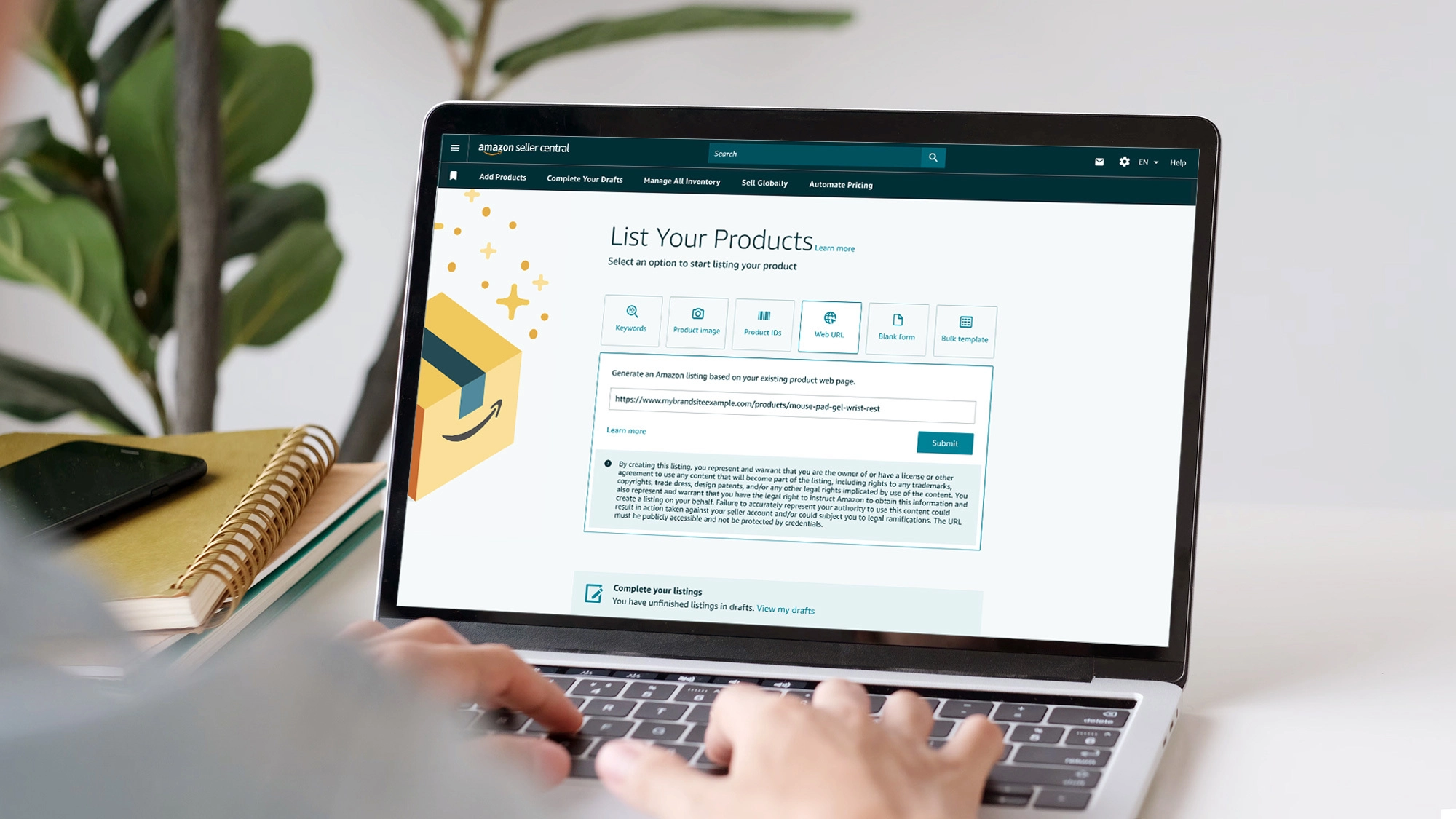
AI-assisted listing creation has moved from a novelty to a standard part of the seller toolkit over the past few years. Amazon itself has built generative AI directly into Seller Central's listing tools, letting sellers generate a draft listing from a product image, a web URL, or a short description rather than starting from a blank form. That shift reflects a broader pattern across the marketplace: sellers managing larger catalogs, expanding into new categories faster, and localizing listings across marketplaces in ways that would be far more labor-intensive without AI assistance.
The competitive effect is worth naming honestly. As AI-assisted listings become the norm rather than the exception, the differentiation shifts from "did you use AI" to "how well did you brief it, and how carefully did you edit what it gave you." Sellers who treat AI output as a finished product tend to produce listings that read like everyone else's. Sellers who treat it as a fast first draft, then layer in real product knowledge, customer research, and category-specific compliance checks, are the ones who actually see the speed benefit turn into a ranking or conversion benefit.
Best AI Tools for Amazon Product Listings
Amazon's built-in AI tools (Add Products, A+ Content Manager) Free with an active selling plan, and built to auto-comply with Amazon's own current formatting rules since Amazon controls both the tool and the rules. A solid starting point for sellers with a smaller catalog who want a fast, compliant first draft without a separate subscription.
Specialized Amazon listing generators (such as Helium 10's listing tools, Jungle Scout, CopyMonkey, and Perci). These tools are built specifically around Amazon's listing format and typically add keyword research, search volume data, and restricted-phrase scanning on top of basic generation. Worth evaluating if you manage a larger catalog or want keyword research and listing generation in one workflow instead of switching between separate tools.
Bulk and multi-marketplace tools (such as Tool4Seller's listing generator). Useful if you're localizing listings across several Amazon marketplaces and need to generate titles, bullets, and descriptions in multiple languages from the same product inputs.
General AI assistants (such as ChatGPT or Claude). Flexible and often already part of your workflow, but they don't automatically know Amazon's current category-specific rules. You have to supply the character limits and compliance constraints yourself, using a detailed brief and the prompts in this guide.
Whichever tool you choose, run the output through the same review checklist: verify every spec, remove any claim you can't support, and confirm the copy fits your category's current formatting rules in Seller Central before you publish.
Conclusion
AI won't write a winning Amazon listing on its own, and it isn't supposed to. It removes the blank-page problem, gives you variants to test, and speeds up the mechanical parts of listing creation, structuring specs into benefit-led copy, drafting five bullet options, translating a description for another marketplace. The part that still depends entirely on you is the brief you build, the claims you verify, and the editing you do before anything goes live. Use the seven-step process and the prompts above as your starting checklist, and treat every AI draft as exactly that of a draft.